













Draw Pixel Art











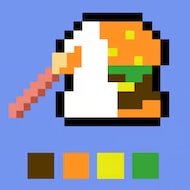
You click into a fresh grid, glance at the tiny reference thumbnail in the corner, and start tapping cells with whatever color happens to be selected. Thirty seconds later the timer bar has dropped further than expected and half your tiles are the wrong shade. That moment — realizing speed without a plan gets you nowhere — is basically the entire lesson Draw Pixel Art teaches in its first few levels.
| Genre | Casual puzzle / art recreation |
| Platform | Browser, desktop and touchscreen |
| Core loop | Fill a pixel grid to match a hidden reference before time runs out |
| Session length | A few minutes per level |
Reading the Reveal Timer Before You Touch a Cell
Every level starts by showing you the finished image for a few seconds before the grid goes blank. New players tend to skip past this part, eager to start clicking, and that habit costs them more time than any misplaced pixel does. Spend those first seconds actually studying the shape — where the outline breaks, where two colors touch, where a single stray pixel changes the whole silhouette. The word “game” gets thrown around a lot in reviews of this kind of title, but Draw Pixel Art earns it specifically because the reading phase is as much a puzzle as the filling phase.
By the time you reach the double-digit levels, the reference image flashes for less time, and the grid itself grows from a modest square into something closer to sixty or seventy cells across. That jump is where a lot of casual players quietly drop off, because the strategy that worked on a small grid — memorize it all at once — stops being physically possible.
Experienced players instead break the reference into quadrants, memorizing one section, filling it, then re-checking the thumbnail for the next. It is a small adjustment but it is the difference between finishing with ten seconds to spare and running out mid-row.
Palette Priority and Why Color Order Matters
The color palette sits along the bottom of the screen, and it is tempting to just grab whichever swatch is closest to your cursor. That works fine on early boards. It stops working once a level introduces four or five near-identical shades of the same hue, which Draw Pixel Art starts doing to separate players who are pattern-matching from players who are actually looking.
- Select the least common color first, since it is usually the one you will forget to place if you save it for last.
- Group your clicks by color rather than by grid position — it is faster and reduces mis-taps.
- Use the difficulty toggle or the hint marker if a board’s color separation is genuinely hard to see, rather than guessing and burning a mistake.
Speedrunners in the small community around unblocked pixel-art games talk about “palette scanning” as a habit worth building early, and it holds up here.
Why Draw Pixel Art Gets Harder Mid-Session
Difficulty in this game does not climb in a straight line. It plateaus for a stretch, then spikes once grid size and color count increase together instead of one at a time. Puzzle-minded players tend to enjoy that spike, since it finally rewards the memorization habits built earlier, while players who came in purely for a relaxing break often find that same stretch frustrating. Both reactions are fair — it is a genuinely divisive shift in pace that shows up in almost every comment section about the game.
Mobile players face an extra wrinkle here: touchscreen taps are slightly less precise than mouse clicks, so a crowded palette bar can lead to selecting the wrong swatch by accident. Zooming in before committing to a run helps more than it seems like it should.
Common Mistakes New Players Make
Is Draw Pixel Art timed on every level?
Yes, every standard level runs on a countdown, though the exact length scales with grid size. Later levels give you more total time but far less time per cell, which is why efficient color-grouping matters more as you progress.
How many levels does Draw Pixel Art have?
The level count grows over time as new boards are added, and difficulty is tiered rather than fixed, so newer levels are noticeably harder than the earliest ones rather than simple palette swaps.
Why do I keep failing on levels that look simple?
Almost always it comes down to skipping the reveal phase. A grid that looks simple in the preview can still hide two or three cells with near-matching colors that only become obvious once you have already started filling.
None of this makes Draw Pixel Art a demanding game in the traditional sense, but it rewards the same habits any good puzzle title does: look before you commit, group your actions, and treat the reveal timer as part of the challenge rather than a delay before the real one starts.
Comments
There are no reviews yet. Be the first one to write one.