






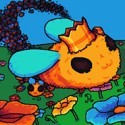








Antivirus Survivors 2003 Professional

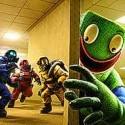
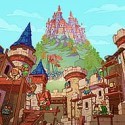







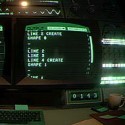




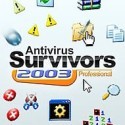
You double-click a folder, dodge a spreading void, and a spam pop-up lands right where you wanted to stand. Antivirus Survivors 2003 Professional turns a family computer that has been infected again into an arena, and your job is to clear it with weapons like Pinball, Solitaire and Firewall. The mix of desktop nostalgia and bullet heaven pressure makes every run feel like defragging your nerves.
| Genre | Survivor-like auto-shooter |
| Setting | Y2K-era desktop |
| Players | Single-player |
| Run length | Roughly 30 to 40 minutes |
The Infected Family Computer in Antivirus Survivors 2003 Professional
The setup is a joke that anyone with an old family PC will understand. The machine is infected again, waves of viruses and adware foes are flooding in, and only you stand between the desktop and total pop-up chaos. The game plays it with a straight face and a deep love for early 2000s operating systems.
Runs last roughly 30 to 40 minutes, which puts the game in the classic survivor-like range: long enough to assemble a strong loadout, short enough to try again immediately.
Players who grew up on early 2000s desktops will catch nearly every reference, while younger players get a crash course in the folders, wallpapers and keygens of a bygone era. The nostalgia is heavy, and it lands hardest for people who lived through it.
Double-Clicking Folders for XP and Keys
Movement is only half the loop. You double-click through folders as you dodge voids and fight viruses, and searching for XP and keys means opening files as you go. That turns every folder into a small decision: go for the reward, or stay alive a little longer.
Completing tasks and policies during a run earns bonuses, so the map carries optional goals layered on top of survival. Beginners often ignore them at first, yet they are part of what pushes a run from merely surviving to thriving.
Because the shooting is automatic, positioning and route choice do the heavy lifting. Some players will miss manual aiming, but the auto-shooter design puts the focus on where you stand and what you open next.
Twenty-Four Weapons From Pinball to Firewall
The game includes 24 weapons inspired by the 2000s computing era, among them Pinball, Solitaire, Mines and Firewall. Each one is a nod to a program from the period, and the roster is a big part of why the game feels like a love letter rather than a generic clone.
Early in the game you pick a starting weapon and learn its rhythm, then start feeding it upgrades. Unlocking more weapons is tied to tasks, so trying different loadouts becomes part of progression rather than an afterthought.
Bullet heaven veterans will look for the weapon that scales best, while tinkerers will try odd pairings just to see what happens. The variety is what keeps a 24-weapon roster from feeling padded.
Drivers and Plugins: Rewriting How Weapons Behave
Drivers are bespoke upgrades that change how a weapon usually works, and there are 50 of them. Where a normal upgrade nudges a number, a driver changes behavior, so picking one is closer to choosing a new playstyle for that weapon.
Plugins add another layer, with 62 of them available. You open keygens to install plugins that greatly modify weapons and player stats, and the keygen is one of the game’s best jokes, since it sends you digging through folders for something that once would have been a questionable download.
Between drivers, plugins and 18 player stats such as damage, speed and luck, a run can go in many directions. Newcomers may find the number of options overwhelming at first, but each choice is a small step rather than a lifelong commitment.
File Types Worth Opening: LemWire, BigWave and Defrag
The game has 33 file types you can double-click for rewards, including LemWire, BigWave and Defrag. Each type pays out in its own way, so knowing which files to open in a hurry and which to save for a calmer moment is a real skill.
This is the part of the game that feels most like exploring an old hard drive. Opening a file means committing to a small detour, and a detour through a crowded folder can be dangerous. Players who enjoy risk-and-reward decisions will love the tension.
The names reward anyone who remembers the file-sharing era, and part of the fun is spotting the nods. Players without that memory can still enjoy the mechanic, since the reward logic is clear on its own.
Protocol Folders and Policies: Five Levels of Risk
Difficulty comes in five levels, each a protocol folder with escalating risks and rewards. Starting at the first folder is the safe way to learn the game, and stepping up is where the rewards begin to justify the danger.
Policies are the second layer: 15 unique challenges that let you play under harder or more unusual rules. They turn a run you already know into something new, and they sit alongside the tasks that earn bonuses.
Score-attack fans will treat protocol folders and policies as a ladder, while relaxed players can ignore the higher levels and still enjoy a full run. That flexibility is one of the strongest points of the design.
Bosses, Mini Bosses and Spam Pop-Ups
The game has six bosses and mini bosses in total, described as supercharged enemies and powerful bosses. They act as checkpoints in a run, and the difference between arriving with a strong loadout and arriving with a weak one becomes clear quickly.
Between bosses, the pressure comes from viruses and adware foes, voids to dodge, and spam pop-ups to evade. The pop-ups are the most on-theme hazard, a clever nod to the worst habit of early 2000s computing.
Six bosses may sound like a small number, and some players will wish for more. The trade-off is that the wide range of weapons, drivers and plugins does most of the work of keeping each run different.
Meta Upgrades, Wallpapers and Themes in Antivirus Survivors 2003 Professional
Progression continues between runs. Meta upgrades let you choose how to shape your path, and every finished run adds to a growing list of goals:
- 18 meta upgrades for long-term progression
- More than 200 tasks that unlock new files, weapons and plugins
- 81 wallpapers and 8 themes to customize your desktop
Wallpapers and themes are purely cosmetic, and they suit players who like collecting and personalizing. They also give the game a satisfying sense of owning a machine you have cleaned up.
The honest caveat is that this much meta progression can feel like a grind for players who prefer a self-contained run. Those who love unlocking things will find a long road, and those who do not can stick to the basics.
Questions Players Ask Before the First Boot
- How long is a run? A typical run takes roughly 30 to 40 minutes, covering folder exploration, file opening, fights with viruses and the bosses at the end. That length suits players who want a full session without a huge time commitment.
- What are drivers and plugins? Drivers are bespoke upgrades that transform how a weapon usually works, and plugins are installed by opening keygens to greatly modify weapons and player stats. Together they form the core of how you shape a loadout.
- How do I unlock new weapons? Completing tasks is the main route, and there are more than 200 of them. Tasks unlock new files, weapons, plugins and more, so the more varied your runs are, the faster the roster fills in.
Antivirus Survivors 2003 Professional works because it takes an old joke, the family computer that is never really clean, and turns it into a tight survivor-like with real depth. Between Pinball and Firewall in your loadout, a keygen that hands out plugins, and LemWire, BigWave and Defrag waiting in the next folder, every double-click feels like a decision. Boot up, dodge the void and see how far the family PC can go.
Comments
There are no reviews yet. Be the first one to write one.