















Trauma lab















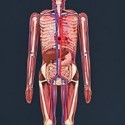
You tap a spot on the body, hold to keep firing, and Trauma Lab follows the shot through skin, muscle, bone and organs while the status panel updates Pulse, NIBP, SpO2 and Blood readings. It is an anatomy and physics sandbox, and the point is watching how a body responds rather than following a story. The subject matter is heavy, but the focus stays on readouts, layers and cause and effect.
| Genre | Anatomy and physics sandbox |
| Main Modes | Sandbox, Keep Him Alive, Simple and Complex surgery |
| Tool Categories | Hand, Weapons, Props, Medicine, Powers |
| Tracked Readings | Pulse, NIBP, SpO2, Blood and wound notes |
| Platform | Browser, Windows, Android |
| Status | In development |
How Trauma Lab Tracks a Single Shot Through the Body
Each bullet is followed through the layers of the body, and the interface keeps score with four readings: Pulse, NIBP, SpO2 and Blood. Wound notes sit beside them, so every shot leaves a written trail of what happened, not just a visual change. Early in a session, the best habit is to watch those numbers after every action instead of firing rapidly and losing track of cause and effect.
X-Ray is the tool that makes sense of it all. Opening it gives you Layers, which lets you choose a body layer, and Examine, which lets you inspect what you see. Ammunition types are listed on screen too, so you can compare how different choices change the readings.
The premise will not suit everyone, and that is worth saying plainly. Some players find a simulation built around gunshot wounds uncomfortable, while others treat it as a curious look at anatomy and physics. The game is still in development, so expect rough edges alongside the ambitious simulation.
Sandbox Mode: Every Weapon, Tool, Chemical and Power in Trauma Lab
Sandbox opens everything: every weapon, tool, chemical and power is available from the start. A bottom bar organizes them into five categories, Hand, Weapons, Props, Medicine and Powers, so switching between ideas is quick. This is the mode for tinkerers who like to poke at a system and see what happens.
Players who love physics toys will get the most out of the Props and Powers categories, since they invite experiments that do not need a plan. The tracked readings stay on screen the whole time, which means even a silly test still produces data you can read afterward.
A common beginner mistake is to jump straight to the most dramatic options and ignore the vitals entirely. Sandbox teaches far more when you try one tool at a time, check the readings, open X-Ray and compare, because the simulation only becomes interesting once you notice what changed.
Keep Him Alive: Ten Emergencies, Medicine Only
Keep Him Alive flips the sandbox on its head with ten real emergencies where you can only use medicine. Everything that made Sandbox playful is taken away, and the Medicine category becomes your only toolbox. The menu also lists Simple and Complex surgery, which sit beside it as separate options.
Because you cannot shoot, push or power your way out of a problem, mistakes come from misreading the vitals. Once the readings start to drop, Pulse, NIBP, SpO2 and Blood are the information you have to act on, so careful players who read the panel calmly do better than players who rush.
This mode suits the medically curious and anyone who likes a puzzle built around triage instead of speed. It is also where the sandbox feels most like a game with goals, since there are ten specific cases to work through instead of an open playground.
Browser, Windows and Android: Where Trauma Lab Runs
The simplest way in is the HTML5 browser build on the itch.io page, where a click on Run game starts the simulation. Windows and Android versions are also listed, so players who want a downloaded copy or a phone-friendly one have options. Controls are simple: tap or click the body spot, and hold to keep firing at it.
Development is still ongoing, which means features and menus can change from one update to the next. A separate supporter playtest build exists for players who want to try newer work early, and that tells you how actively the sandbox is being shaped.
Casual browser players will enjoy how quickly Sandbox gets going, while players who want longer sessions may prefer a downloaded copy. Either way, expect a project that is still growing rather than a finished product.
Questions About Trauma Lab Answered
Most players arrive with the same few questions, usually about the two main modes, the strange abbreviations on the status panel and the anatomy view. The answers below stick to what the menus and readouts actually show.
The sandbox rewards curiosity more than memorization, so these answers are a starting point rather than a manual.
- What is the difference between Sandbox and Keep Him Alive in Trauma Lab? Sandbox is open-ended play with every weapon, tool, chemical and power unlocked. Keep Him Alive gives you ten real emergencies where only medicine is allowed, so you must treat instead of experiment.
- What do Pulse, NIBP, SpO2 and Blood tell you? Pulse is the heart rate, NIBP is non-invasive blood pressure, SpO2 is blood oxygen saturation and Blood tracks blood volume. Together with the wound notes, they show how the body is coping after each action.
- How do you inspect the anatomy in X-Ray view? Open X-Ray, then use Layers to choose which body layer to look at and Examine to inspect it closely. It is the best way to understand what a shot did on its way through skin, muscle, bone and organs.
Trauma Lab is at its best when you slow down and read what the body is telling you. Whether you are experimenting in Sandbox, treating a case in Keep Him Alive or scrubbing through layers in X-Ray, the real reward is understanding how Pulse, SpO2 and Blood move together after every action.
Comments
There are no reviews yet. Be the first one to write one.
