









Universe Sandbox 2











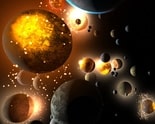
You drag a second Moon into orbit around Earth, speed up time and watch the two satellites tug at each other until one crashes into the planet in a glowing burst of debris. Universe Sandbox 2 is built for experiments like that — a gravity simulator where planets, stars and black holes all react to each other.
Gravity as the Main Tool in Universe Sandbox 2
Everything in this game is pulled by gravity. Planets orbit stars, moons orbit planets and anything placed close enough to a massive object starts falling toward it. Changing the mass, speed or position of a single body can reshape an entire system.
The first experiments usually involve the Solar System preset. Adding mass to the Sun, removing Jupiter or pushing Earth into a new orbit shows right away how delicate those orbits really are.
Time controls make all of this visible. Slowing time lets you watch a collision frame by frame, while speeding it up shows changes that would take years or centuries in reality.
Collisions, Black Holes and Climate
Collisions are what most players come for. Smashing two planets together creates fragments that spread out, and some of them pull back together over time. The results change depending on speed and angle, so no two crashes look exactly alike.
Black holes add another layer. Placing one near a star system pulls everything inward, and objects that get too close are torn apart. The Roche limit — the distance where a body breaks apart from tidal forces — becomes very visible when a moon gets too close to a planet and shatters into a ring.
The simulation also tracks temperature and climate. Moving Earth closer to the Sun heats the surface until oceans boil away, while moving it outward turns its oceans to ice. That detail helps explain why many teachers and science fans use the simulator for demonstrations.
Universe Sandbox 2 Mistakes Beginners Make
The interface can feel overwhelming at first. Menus for properties, tools and settings are packed with options, and beginners often get lost trying to find a simple feature.
A common mistake is running time too fast. When the simulation speed is too high, small objects can skip past each other instead of colliding, and orbits can become unstable. Lowering the speed usually fixes it.
Players focused on spectacle tend to stick with the collision tools, while science-minded players spend hours tweaking orbits and building stable custom systems. Both approaches are valid, and the sandbox supports them equally.
Performance and the Debate Around It
Large simulations can be demanding. Hundreds of fragments from a big collision can slow things down, and players with weaker hardware often notice drops in performance.
Some players also wish there were more guided content or challenges. The sandbox offers almost unlimited experimentation, but without goals, some people lose interest after the first few big crashes.
Others see that openness as the point. With a few minutes and a curious idea, you can recreate how the Moon may have formed or test what happens if Earth lost its Sun.
Questions People Ask
- Why do objects pass through each other instead of colliding? The time speed is probably too high. Lowering the simulation speed gives the physics enough steps to register collisions properly.
- Can I create a ring around a planet? Yes. Moving a moon inside a planet’s Roche limit breaks it apart, and the debris spreads into a ring around the planet over time.
- Is it useful for learning astronomy? Very much. Experimenting with orbits, gravity and climate shows how planets and stars interact in a way that is much easier to understand than reading about it.
Universe Sandbox 2 hands you the Sun, the Moon and a toolbox of black holes, then lets you rewrite the rules of the Solar System. Whether you build a ringed Earth or watch planets collide, every experiment shows how powerful gravity really is.
Comments
There are no reviews yet. Be the first one to write one.
